
Simplifying Assessments and Grading for Schools
Ask a teacher where their students’ marks are and the honest answer is usually “in my mark book.” Ask the head teacher the same question about the whole school and the answer is “distributed across every mark book in the building.”
Grading is one of the most demanding parts of school administration — not because recording a score is hard, but because of everything that has to happen to that score afterwards. Marks get copied from mark books to report cards, from report cards to summaries, from summaries to files. Every copy is a chance for error, and every report season is a fresh round of the same manual work.
The real cost of scattered marks
The mark book works fine as a capture tool. The strain appears downstream:
- Re-entry. The same score is written in the mark book, then typed into the end-of-term report, then re-entered into whatever summary the office keeps.
- Slow reporting. Compiling results for a class means collecting marks from each teacher, in whatever format each one happens to keep.
- Thin history. When a parent asks how their child performed last year, the answer depends on whether last year’s mark books are findable.
- No shared view. The teacher, the head and the parent each hold a fragment of the student’s academic picture.
Grading on the student record
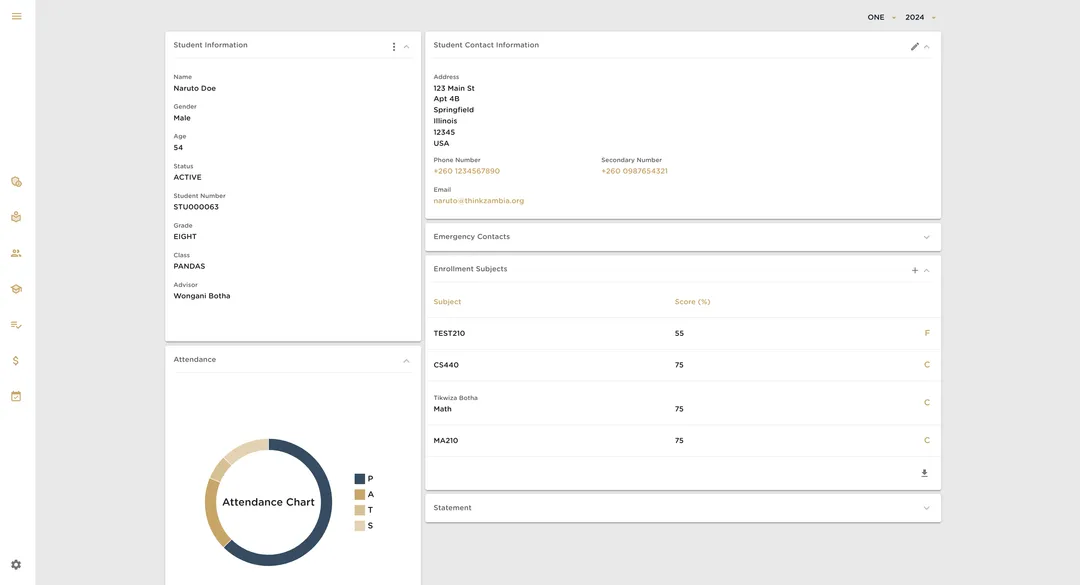
Katanga takes a different starting point: the subjects a student is enrolled in already exist on their record, because enrollment was set up when the term began. Assessment then becomes a matter of recording scores against those subjects — not maintaining a parallel document for each class.
The practical effect is that academic results live in the same place as everything else about the student. Open a student’s profile and their subjects and scores are there alongside their attendance and enrollment, for the current term and for the terms behind it.
That structure changes reporting in two ways. First, it removes the copying: a score entered once is visible everywhere it needs to be, instead of being transcribed into reports by hand. Second, it keeps history automatically — last year’s results do not need an archive system, because they never left the student record.
The teacher’s side of it
For this to work, the capture step has to respect how teachers actually work. Teachers think in classes and subjects, not in databases — “my Grade 8 Pandas, Mathematics” is the unit of work. Katanga’s teacher dashboard is organized around that same structure, so recording results stays close to the work of teaching rather than becoming a separate administrative chore.
Administrators see a different view of the same data: which classes have results captured, which students have gaps, how a cohort is performing — without chasing mark books to assemble it.
What end of term looks like
The moment this structure earns its keep is the end of the term. In the mark-book model, report season means collecting every teacher’s marks, checking for gaps, re-entering them into reports, and discovering missing scores days before deadline.
When scores are recorded against subjects on the student record as the term goes, the end of term becomes a review instead of an assembly job. The administrator can see which classes still have gaps while there is still time to chase them, and the student’s results — once complete — are already part of the record that follows them into the next year.
What this is not
We are careful not to oversell here. Digitizing assessment does not make grading better — the quality of assessment is still the teacher’s craft. What it changes is the administration around the marks: less re-entry, faster reporting, and a history that persists as the student moves through the school.
Where it fits
Grading sits inside the broader student record in Katanga — the same record that holds enrollment, attendance and billing. That is deliberate. A school’s picture of a student is only complete when all of it lives in one place, and marks are one of the pieces that matters most.
If your school compiles results by hand each term, it may be worth seeing how the same process works when the record is shared. You can create an account or compare plans on the pricing page.